
Aspire Account Center
Atlanticus ServicesFinance
3.3969.00 Reviews
- Version
- 4.22.47-6102
- Installs
- 500.00K
- Age Rating
- Everyone
Screenshots


Our Review of Aspire Account Center
 Analysis by Appyee
Managing a credit card from a phone sounds simple, but the quality of the experience depends on whether the app helps me answer ordinary questions quickly: What is my balance? When is my payment due? Has a recent payment gone through? Can I check my account without reaching for a laptop? Aspire Account Center is built around that practical purpose. It is a free finance app from Atlanticus Services for people who want to keep their Aspire credit card information in one place.
After spending time with it, I see it as a focused account-management tool rather than a complete personal-finance system. It does not try to replace a budgeting app, a bank dashboard, or a broad credit-monitoring service. Its value is narrower and more useful for the right person: it gives Aspire cardholders a convenient mobile doorway to their account. That focus keeps the experience understandable, although it also means users looking for wider money-management features may quickly reach its limits.
How Aspire Account Center feels in everyday use
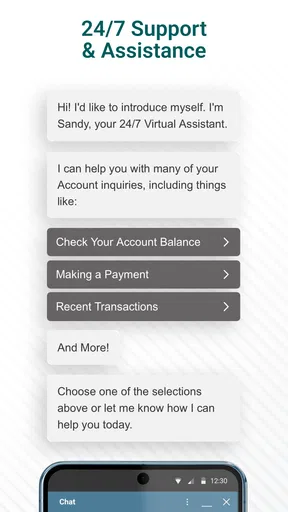
The first thing I noticed is that the app makes more sense when I treat it as a companion to the card, not as a general finance hub. If I already use an Aspire card, having the account available on my phone is convenient for quick checks during the day. I can imagine opening it while standing in a checkout line, reviewing whether a payment has been reflected, or checking account information before making a purchase.
That kind of short session is where the app is most convincing. I do not need a large dashboard filled with investment charts or spending categories when my immediate concern is a card balance. A dedicated account center can reduce the steps between opening the phone and finding the information that matters. The strongest reason to use it is convenience for existing Aspire cardholders, not breadth.
The app is listed as suitable for everyone, which fits its straightforward purpose. It is not presented as an investing platform or a specialized financial calculator. Someone who is comfortable using a phone for routine account checks should find the concept easy to understand. The more important question is not whether the app is complicated, but whether it matches the user’s relationship with Aspire. Without an Aspire account or card to manage, there is little reason to install it.
A realistic payment-day scenario
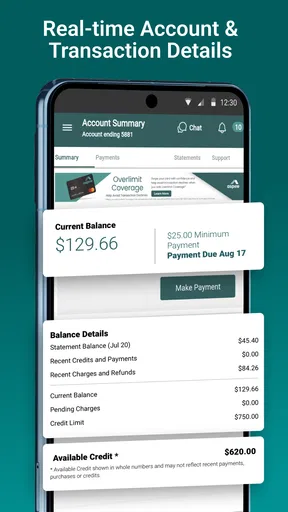
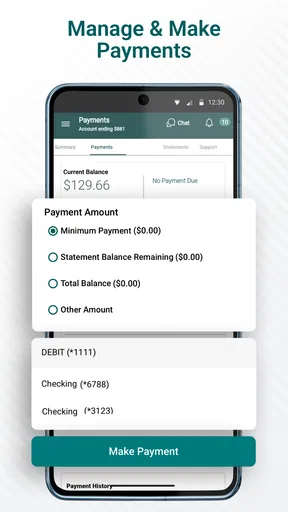
Consider a common situation: I receive a reminder that a card payment is due, but I am away from my computer. I open Aspire Account Center, review the account details, and use the available account-management tools rather than searching through email or trying to remember which browser page I normally use. After making a payment, I can return to the app later to check the account instead of assuming that everything updated immediately.
That workflow is more valuable than it may sound. Credit-card management often involves small decisions made at inconvenient times. A mobile account center gives me a way to act while the information is fresh. It can also help me separate two tasks that people sometimes mix up: checking the balance and actually planning spending. The app may help with the first task, but I would still use a separate budgeting method to decide how much I can safely spend.
My practical advice is to use the app as a checkpoint before and after important account actions. Before paying, review the current account information. After paying, check again later rather than relying only on a confirmation screen. This is not a claim that every update will appear instantly; it is simply a sensible habit when managing credit from any mobile service.
What the current version tells me
The current version is 4.22.47-6102, and that matters because an account-management app should be judged as a maintained product rather than only by its original launch. Aspire Account Center first appeared on June 25, 2019, so it has had time to move beyond its earliest release. I would not treat the version number alone as proof that every part of the experience is polished, but it does show that the app has continued through multiple iterations.
For existing users, the most useful way to think about an updated version is not “what new feature must I find?” but “does my regular account routine feel more dependable?” Small changes in navigation, loading behavior, sign-in handling, or the presentation of account information can matter more than flashy additions in a finance app. A cardholder may never notice a technical change directly, yet still benefit if everyday checks require less friction.
At the same time, I would keep expectations realistic. A version update does not automatically turn a card-management app into a full financial command center. The core purpose remains account access and management. If I need detailed spending analysis, several financial institutions in one view, or a long-term budget plan, I would look elsewhere instead of expecting this app to evolve into something it was not designed to be.
Who benefits most from the focused design
I think the app is best suited to three kinds of users. The first is an Aspire cardholder who prefers handling routine tasks on a phone. The second is someone who wants a dedicated place for card information instead of navigating a general banking website. The third is a user who checks an account in short bursts and values direct access more than extensive financial analysis.
It can also be useful for people who do not want to install a large, multi-purpose money app. A broad finance application may require connecting several accounts, configuring categories, and learning a more complicated interface. Aspire Account Center has a clearer boundary: it is for the Aspire account. That narrower role can feel less overwhelming, especially for someone who only wants to keep up with one card.
However, the same focus creates a clear reason to skip it. If I want one place to compare checking, savings, loans, and cards from different providers, this is not the right tool. The usual alternative in that situation is a multi-account finance app or the official mobile app from a primary bank. Those options may offer a wider view, while Aspire Account Center should be chosen for direct Aspire access rather than financial aggregation.
Useful habits that are easy to overlook
One useful habit is to distinguish account access from account control. Opening the app to inspect a balance is not the same as having a complete picture of upcoming obligations. I would pair the app with a calendar reminder for payment dates and a simple note or budget for planned expenses. This prevents the common mistake of treating the displayed balance as the amount that is automatically safe to spend.
A second insight is that a dedicated card app can be especially helpful when I am away from my usual banking setup. If I am traveling, shopping, or handling a purchase from a different device environment, a single-purpose account center may be quicker than logging into a desktop site. I would still avoid using an unfamiliar public network for sensitive financial activity when a safer connection is available, but the mobile format is useful precisely because account questions often arise away from home.
A third tip is to use the app for verification, not just action. After making a payment or reviewing a recent transaction, I would make a note of what I expect to see next. If the account view does not match that expectation, I can investigate sooner instead of discovering the discrepancy when preparing the next payment. This turns a passive balance check into a small but effective monitoring routine.
A fourth trade-off is worth mentioning: keeping a dedicated finance app installed can make account access faster, but it also adds another place to protect. I would use a strong device lock, avoid sharing access casually, and keep the phone’s operating system in good condition. The app’s convenience is worthwhile only if I treat the phone itself as part of the security boundary.
How it compares with browser access and broader finance apps
The most obvious alternative is using Aspire through a mobile browser. Browser access can be perfectly adequate for occasional users, especially someone who does not want another app taking up space. The dedicated app becomes more attractive when I check the card regularly and want a repeatable mobile routine. Opening an installed app is usually more direct than finding the correct website, entering it manually, and navigating from there.
A broader finance app offers the opposite advantage. It may help me see multiple accounts together and understand overall spending, but that convenience can come with setup work and a less direct relationship with the Aspire account. If my priority is a complete household money picture, I would favor the broader tool. If my priority is managing one Aspire card, the focused app is easier to justify.
A bank’s main app may be better for users whose financial life is centered elsewhere. For example, if I primarily need transfers, deposits, savings goals, and card management from one bank, I would not choose Aspire Account Center as my main financial app. Its role is more specific, and that specificity is both its strength and its boundary.
Where the experience still needs patience
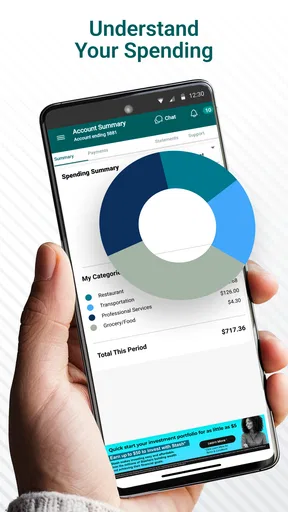
The biggest limitation is the narrow scope. I cannot reasonably expect a card account center to provide the same planning tools as a dedicated budget service. Users who want automatic categorization, long-term spending trends, or a combined view of several providers may find the app too basic for their routine. That is not necessarily a flaw in the app’s central mission, but it is an important buying decision.
Another potential source of friction is that financial apps are judged more harshly than ordinary utility apps. A delayed account update, an interrupted sign-in, or an unclear payment status can create anxiety even when the underlying account is fine. My recommendation is to avoid making a last-minute payment decision based only on a quick glance. Give the information time to refresh, keep confirmation details, and contact the card provider through an official support route if something important remains unclear.
The average rating is 3.3 from around 2.1 thousand ratings, with close to 1,000 written reviews. I read that as a mixed signal rather than an automatic rejection. Enough people find the app useful for it to have a meaningful audience, but the rating also suggests that the experience may not be equally smooth for everyone. Finance apps can receive low scores for issues involving access, account updates, or individual circumstances, so I would pay attention to recurring complaints while remembering that a rating cannot predict every user’s experience.
The app has passed the half-million-install mark, which indicates that it is not an obscure experiment with no established audience. Still, popularity should not replace practical testing. I would install it, sign in carefully, and see whether the account information and routine actions fit my needs before making it the only way I monitor the card.
Compatibility, cost, and setup expectations
Aspire Account Center is free to download, which makes trying it low-risk from a purchase perspective. The free price does not mean the card itself has no costs or conditions; those belong to the account agreement rather than the app download. I would always review the card’s own terms before relying on any mobile tool for payment planning.
The app requires Android 6.0 or later. That covers a wide range of devices, although people using very old phones should still consider whether their device receives current security updates. Compatibility is only one part of a safe finance setup. A supported app on an outdated or poorly protected phone is not as reassuring as a supported app on a device that is regularly maintained.
Setup should be approached like any financial login: use the official app listing, enter credentials privately, and avoid saving sensitive information in places that other people can access. I would also check that the account details shown after signing in correspond to the correct cardholder profile. That small verification step is especially worthwhile when a phone has previously been used for another person’s financial accounts.
What I would watch in future updates
For future releases, I would look for improvements that make routine account management clearer rather than simply adding more screens. Better explanations around payment status, clearer distinctions between current and available amounts, and smoother recovery when access is interrupted would have a direct effect on trust. These are the details that determine whether I feel comfortable using the app during a time-sensitive account task.
I would also watch how the app balances simplicity with useful context. Adding too many financial tools could make a focused account center harder to navigate, while adding no helpful context could leave users switching to another service for basic planning. The ideal direction would preserve quick Aspire access while making important account information easier to interpret.
Because the product has developed from a 2019 release to version 4.22.47-6102, I expect existing users to judge it by consistency over time. A good update is not necessarily dramatic; it may simply make the same payment-day routine more predictable. I would be more interested in dependable account presentation and transparent status information than in features that distract from the card itself.
My recommendation for Aspire cardholders
I would recommend Aspire Account Center to an Aspire cardholder who wants a free, dedicated way to check and manage the account from an Android phone. Its focused design makes sense for quick balance reviews, payment routines, and account checks away from a computer. The app is also a reasonable choice for someone who does not need a full budgeting platform and prefers not to combine every financial account in one dashboard.
I would not recommend making it the sole financial tool for a household that needs broad budgeting, multiple-bank aggregation, or detailed spending analysis. In that case, a broader finance app or a primary bank’s mobile service would probably be more useful, with Aspire Account Center kept as the direct companion for the Aspire card if needed.
My final view is positive but measured. The app solves a specific problem and does not need to pretend to solve every money-management problem. Its value comes from giving Aspire users a practical mobile access point, while its limitations come from that same narrow purpose. If you already manage an Aspire card and want straightforward account access on your phone, it is worth trying; if you want a complete financial planning system, choose a wider tool instead.
Verdict
Strengths of Aspire Account Center
- Centralizes account details and settings in one place.
- Makes it easier to review and manage personal information.
- Provides quick access to account-related support options.
- Helps users keep track of available Aspire services.
- Clean layout makes essential account tools easy to find.
Limitations of Aspire Account Center
- Some features may require an eligible Aspire account.
- Limited usefulness if you only need occasional account access.
- Certain settings may redirect you to external support channels.
- Availability of tools can vary by account type or region.
- Users may need to verify their identity before making changes.
Similar Picks in This Category
View All
Google Wallet
Google LLC4.3

Airtel: Recharge, Bank & Loans
Airtel4.0

PayPal - Pay, Send, Save
PayPal Mobile4.2

DANA Indonesia Digital Wallet
PT Espay Debit Indonesia Koe4.5

Binance: Buy Bitcoin & Crypto
Binance Inc.4.8

Cash App
Block, Inc.4.7
Frequently Asked Questions
What is Aspire Account Center used for?
Aspire Account Center is designed to give Aspire customers a central place to manage account-related information and services. Depending on the Aspire product and region, users may be able to review account details, monitor activity, access support, manage settings, and complete administrative tasks without contacting customer service for every request. Available tools can vary by account type.
Is Aspire Account Center free to download and use?
Downloading Aspire Account Center may be free, but access to specific features depends on the Aspire service connected to your account. Some account products, transactions, subscriptions, or optional services may involve separate charges or eligibility requirements. Before using the app, review the official terms, pricing information, and service conditions that apply to your Aspire account.
What information is required to sign in to Aspire Account Center?
You generally need valid credentials associated with your Aspire account, such as an email address, username, customer number, or password. The sign-in process may also request identity verification or a one-time security code, particularly when accessing sensitive information. Make sure your contact details are current so password recovery and verification messages can reach you.
Is Aspire Account Center safe for managing personal information?
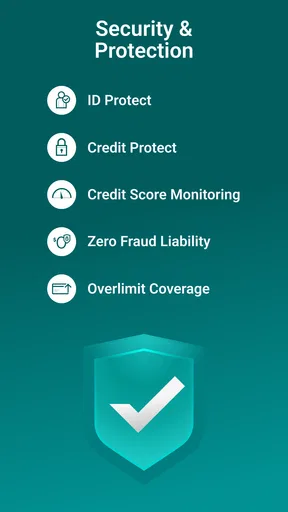
Aspire Account Center is intended to provide secure access to account information, but users should still follow basic security practices. Download it only from an official app store or trusted Aspire website, keep the application updated, use a strong unique password, and avoid signing in over unsecured public networks. Never share verification codes or login details with anyone.
What should I do if Aspire Account Center is not working or I cannot access my account?
If the app does not open, first check your internet connection, install available updates, and restart your device. If login problems continue, use the official password-recovery or account-verification options rather than repeatedly entering uncertain credentials. For locked accounts, missing verification messages, incorrect information, or service-specific issues, contact Aspire support through its official website or approved customer-service channels.
